Automate evidence collection for RFE immigration cases
Updated: July 31, 2026
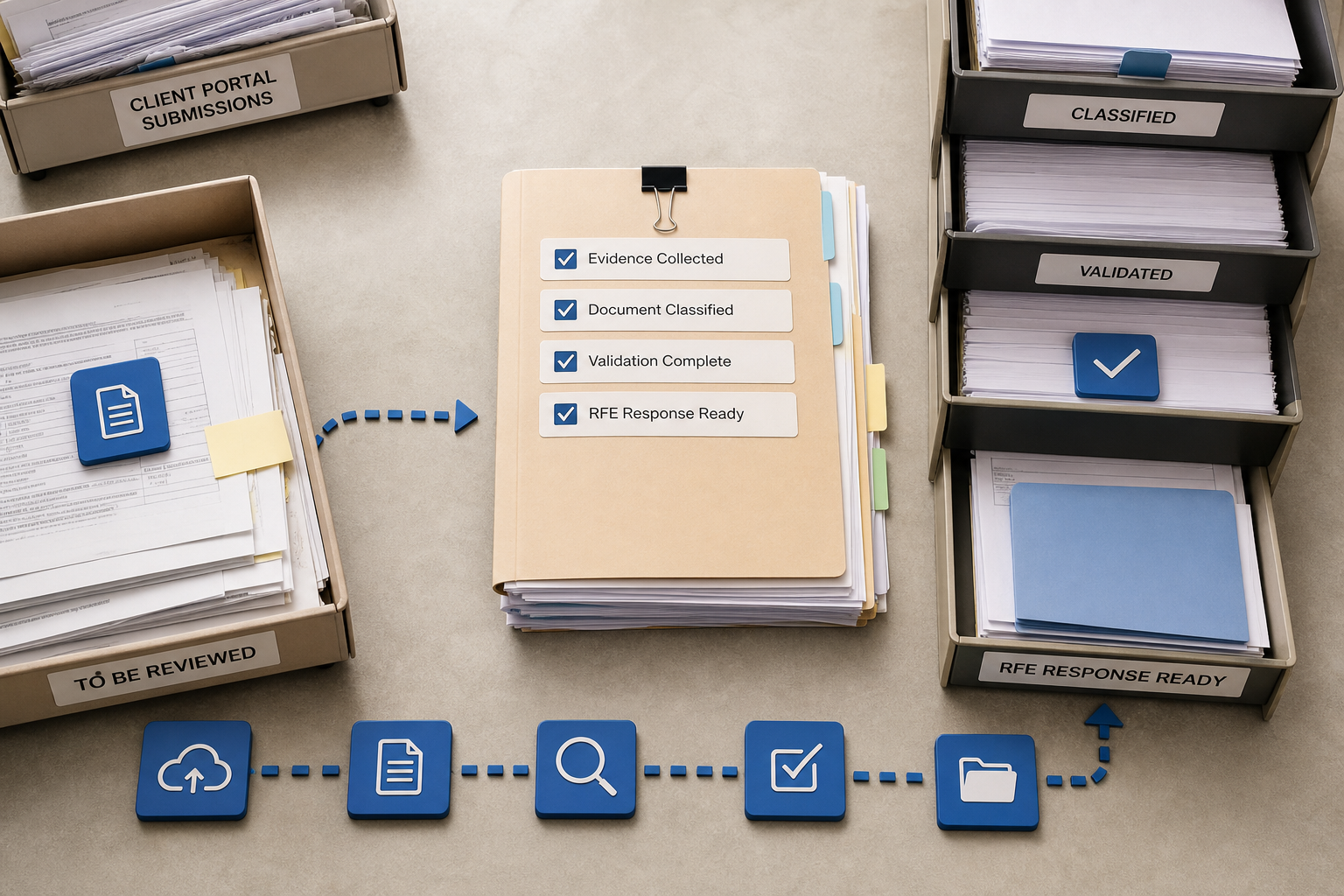
Responding to a Request for Evidence (RFE) can be a time-sensitive, document-heavy process that strains small-to-mid sized immigration practices. This guide explains how to automate evidence collection for RFE immigration cases using LegistAI’s AI-native platform—combining client-facing form templates, an immigration document portal secure upload for clients, automated classification and validation, and workflows that plug into case management to reduce turnaround time and manual rework.
What this guide covers: a mini table of contents, practical templates and examples, an immigration workflow automation checklist for law firms, implementation steps to integrate with existing case management, and measurable controls for compliance and security. Expect concrete checklists, a comparison table of manual vs automated steps, and a sample JSON intake schema to implement templates quickly.
More in Document Automation
Browse the Document AutomationWhy automate evidence collection for RFE immigration cases
RFEs are often triggered by requests for missing or clarifying evidence—pay stubs, letters, translations, proof of status, or supplemental affidavits. Without a standardized intake and verification process, firms face duplicated requests, delayed responses, and increased risk of mistakes. LegistAI positions itself as an AI-native immigration law software designed to help teams handle more RFE work without proportionally increasing staff by automating repetitive tasks and improving evidence quality before submission.
Automating evidence collection reduces time spent on chasing documents and manual triage. When clients submit evidence through a secure portal with validated fields and required document types, paralegals and attorneys spend less time re-requesting materials and more time on legal analysis and drafting. LegistAI supports client-facing form templates and an immigration document portal secure upload for clients, which streamlines intake and makes the initial evidence dataset reliable for downstream AI-assisted classification and drafting tools. This alignment between client intake and internal workflows lowers rework, shortens RFE response cycles, and improves oversight through role-based access control and audit logs.
Key benefits for decision-makers include predictable resource allocation, measurable cycle-time reduction for RFE responses, and compliance controls required by in-house counsel and firm leadership. The remainder of this guide walks through the specifics: template design, automated classification and validation techniques, sample workflows that plug into case management, implementation checklists, and testing best practices to ensure efficiency gains are realized in production.
Design client-facing evidence intake: forms, templates, and secure uploads
Client-facing intake is the first obstacle to fast, accurate RFE responses. The better the intake design, the less time your team spends on clarifying requests and chasing missing items. LegistAI’s approach includes modular form templates, conditional logic, multilingual support, and an immigration document portal secure upload for clients that enforces file types and size limits at submission.
Start by mapping each RFE type to a template. Common RFE categories include employment verification, relationship documentation, financial evidence, and prior immigration history. For each category, define required fields, acceptable file formats, and example documents. Use conditional fields to surface only relevant questions and reduce client confusion. For Spanish-speaking clients, enable translated form labels and help text to increase completion rates and reduce incomplete submissions.
Template components and best practices
- Required vs optional fields: Clearly mark required fields and prevent submission without them.
- File validation: Accept PDF, JPG, PNG, and OCR-friendly scans. Enforce maximum file size and page count to keep uploads reliable.
- Examples and tooltips: Show a small image or description of acceptable documents (e.g., a redacted pay stub with highlighted relevant fields).
- Conditional logic: Reveal supplemental questions only when the client indicates a specific circumstance (e.g., previous name changes).
- Multi-language help: Provide Spanish text and examples inline to minimize misunderstandings.
Design intake with verification in mind. Each uploaded document should capture metadata: document type (selected by client and validated by AI), submission timestamp, OCR-extracted key fields (names, dates, amounts), and a unique evidence identifier for audit trails. The immigration document portal secure upload for clients should allow attachments to be linked to a matter or case number, automatically triggering a downstream classification and review workflow.
Implementation tip: user experience (UX) for high completion rates
Keep forms concise, use progress indicators, and allow partial saves. Enable secure links that expire to protect privacy, and provide a confirmation page summarizing required documents after upload. Include an automated email and in-portal status update acknowledging receipt and showing expected next steps.
Automated document classification and validation techniques
After intake, the next critical stage is quickly verifying and classifying documents so attorneys can focus on legal analysis and drafting. LegistAI combines AI-assisted OCR, rules-based validation, and confidence scoring to automate document classification while preserving lawyer oversight. The goal is to reduce the time from receipt to "verified" for standard evidence types, and to flag ambiguous items for human review.
Automated document classification involves several steps: OCR and text extraction, entity recognition (names, dates, visa categories, amounts), document type prediction, and validation against rules. For example, an uploaded pay stub would be OCR-processed to extract employer name, pay period, gross/net amounts, and dates. The system then checks that the pay period covers the dates requested in the RFE and verifies consistency across multiple documents.
Validation rules and AI confidence scoring
Use layered validation: first apply deterministic checks (file format, presence of required fields), then probabilistic checks (AI model confidence for document type). Each document receives a confidence score. Documents above a configurable threshold are auto-classified into the case file and routed for final review, while those below the threshold trigger a verification task for a paralegal or attorney. Role-based access control ensures only authorized reviewers can mark documents as verified, and audit logs record every change for compliance.
Error handling and escalation
Design workflows for common failure modes: unreadable scans, mismatched names, or missing pages. When the system detects these issues it should create a task with a description, attach the problematic document, and include suggested actions (request a re-scan, translate, or submit a notarized affidavit). The client communication engine can send templated messages requesting specific corrective actions, reducing back-and-forth and clarifying expectations.
Practical controls to reduce false positives include model retraining pipelines fed by verified examples, threshold tuning per document type, and a human-in-the-loop review for first-time templates. Over time, combining these controls with audit logs and role-based approvals delivers a predictable, auditable process for evidence verification.
Sample automated workflows that plug into case management
To shorten RFE responses, automate the flow from client intake to evidence submission. Below are sample workflows that integrate client-facing intake, AI classification, task routing, review, and final assembly into a petition or RFE response package. These workflows assume integration between LegistAI's workflow automation and your existing case management system or matter database.
Workflow A: Standard RFE evidence path (employment-based)
- Trigger: Case team logs an RFE in the matter. LegistAI generates a tailored intake template for the requested items.
- Client receives secure intake link with Spanish option and uploads documents via the immigration document portal secure upload for clients.
- Submission triggers OCR and initial classification. Documents with high confidence are auto-tagged and routed to the "Evidence Assembly" queue.
- Low-confidence or conflicting documents create verification tasks assigned to a paralegal, with automated suggested actions and example templates for client requests.
- Paralegal verifies and annotates documents; the system updates the case file and audit log.
- Attorney reviews assembled evidence, uses AI-assisted drafting to generate the RFE response and support letters, and triggers approvals.
- System compiles the response packet, logs deadlines and sends a filing checklist to the responsible attorney with USCIS tracking reminders.
Workflow B: Complex RFE with third-party records
When evidence requires third-party requests (employers, schools), LegistAI can generate templated request letters and reminders, track outstanding responses, and escalate to a human reviewer when deadlines approach. Each third-party response undergoes the same classification and validation pipeline and can be linked to the primary matter for easy reference.
Below is a comparison table illustrating time and error reduction across manual and automated workflows. This table is meant to guide internal ROI calculations, not to assert universal outcomes.
| Process Step | Manual Workflow | Automated Workflow (LegistAI) |
|---|---|---|
| Client intake and uploads | Email attachments, multiple follow-ups | Secure portal with required fields and file validation |
| Document classification | Manual review and tagging | OCR + AI classification with confidence scoring |
| Missing or poor-quality documents | Repeated client outreach | Automated templated requests and validation reminders |
| Evidence assembly | Manual compilation into packet | Automated assembly and template-driven drafting |
| Auditability | Scattered records and emails | Audit logs, RBAC, document versioning |
Decision-makers should use this comparison to estimate staff hours reclaimed, reduced rework, and improved compliance posture. Essential to success is mapping your current manual steps to these automated equivalents and piloting with a representative sample of RFE types to measure real-world ROI.
Implementation checklist and onboarding timeline for law firms
Implementation should be predictable and staged to minimize disruption. Below is a practical, prioritized immigration workflow automation checklist for law firms and a suggested 6-week onboarding timeline focused on rapid value delivery while preserving compliance controls.
Priority checklist (implementation artifact)
- Define RFE types and map required documents to template categories.
- Configure client intake templates with required fields, conditional logic, example images, and Spanish translations where appropriate.
- Enable secure client portal settings: upload limits, expiration links, and MFA options if available.
- Set up OCR and document classification models with initial sample documents for each template.
- Configure validation rules and confidence thresholds; define escalation paths for low-confidence results.
- Establish role-based access controls and audit logging for all document actions.
- Create standard client communications for missing or inadequate evidence (templated emails/messages).
- Design workflows for task routing, approvals, and automated reminders tied to matter deadlines.
- Pilot with a small set of cases spanning common RFE categories; collect feedback and adjust templates and thresholds.
- Train staff on verification tasks, review workflows, and audit procedures; document SOPs.
- Roll out to the full team and monitor KPIs; schedule quarterly model retraining and template updates.
Suggested 6-week timeline
Week 1–2: Intake template design and portal configuration. Collect representative documents for training and testing. Week 3: Configure classification models, validation rules, and role-based permissions. Week 4: Build task routing and approval workflows; set up client communications. Week 5: Pilot with 10–20 cases, gather metrics on completion and verification rates, and iterate. Week 6: Train broader team, finalize SOPs, and launch full production with monitoring and support.
Onboarding should include training not just on "how" to use the system, but on new responsibilities: when to trust automated classification, when to escalate, and how to document decisions for compliance. Early wins are often in time-to-first-verified-document and reduced client follow-up volume; track these as initial KPIs.
Best practices for quality control, compliance, and security
Automation must be paired with controls. Legal teams and corporate counsel will expect clear audit trails, access restrictions, and repeatable quality checks. LegistAI supports security controls such as role-based access control (RBAC), audit logs, and encryption in transit and at rest to meet common compliance requirements. Implementing the following best practices will help maintain data integrity and defensible procedures.
Quality control processes
Establish a human-in-the-loop review for new templates and for any document types that fall below a confidence threshold. Maintain a schedule to review a random sample of auto-classified documents weekly for the first quarter post-deployment, then monthly after confidence has stabilized. Use those reviews to feed a retraining pipeline for the classification model and refine validation rules.
Compliance and audit
Ensure every action affecting evidence is logged: uploads, automated classification events, human verifications, and final approvals. Audit logs should include timestamps, user IDs, and change reasons. For teams subject to internal or external audits, maintain exportable logs and a folder structure that maps evidence to the RFE and related communications.
Security and data protection
Use encryption in transit and at rest for all client documents, and enforce RBAC so only authorized roles can view sensitive evidence. Implement session timeouts for the client portal and consider two-factor authentication for internal users with elevated permissions. Regularly review access lists and remove former employees or vendors promptly.
KPIs and monitoring
Recommended KPIs to monitor:
- Average time from client upload to verification
- Percentage of documents auto-classified above confidence threshold
- Average RFE response time (days)
- Number of client follow-ups per RFE
- Compliance audit exceptions and resolved findings
Track these KPIs before and after deployment to quantify gains. Combine automated metrics with periodic qualitative feedback from paralegals and attorneys to ensure the system supports legal quality rather than purely throughput.
Appendix: Practical templates and a JSON intake schema
This appendix contains concrete artifacts you can use to accelerate implementation: a sample RFE evidence checklist template and a JSON schema snippet for an intake form that developers can use to generate client-facing forms programmatically.
Sample RFE evidence checklist (employment-based)
- Cover letter identifying the RFE and summarizing enclosed evidence
- Recent pay stubs covering requested time period (PDF/JPEG)
- Employer letter on company letterhead confirming employment dates and duties
- W-2s or tax returns for requested years
- Employment contract or offer letter, if requested
- Translations and certified translations for non-English documents
- Any prior correspondence with USCIS relevant to the RFE
Developer artifact: JSON intake schema (example)
{
  "title": "Employment RFE Intake",
  "languageOptions": ["en", "es"],
  "fields": [
    {"id": "caseNumber", "type": "text", "label": {"en": "Case Number", "es": "Número de caso"}, "required": true},
    {"id": "clientName", "type": "text", "label": {"en": "Client Full Name", "es": "Nombre completo"}, "required": true},
    {"id": "payStubUpload", "type": "file", "label": {"en": "Recent Pay Stubs", "es": "Talones de pago recientes"}, "required": true, "accept": [".pdf", ".jpg", ".png"], "maxFiles": 12},
    {"id": "employerLetter", "type": "file", "label": {"en": "Employer Letter (if available)", "es": "Carta del empleador (si disponible)"}, "required": false, "accept": [".pdf"]},
    {"id": "consent", "type": "checkbox", "label": {"en": "I consent to share these documents with my attorney.", "es": "Consiento compartir estos documentos con mi abogado."}, "required": true}
  ]
}
Developers can adapt the schema to push metadata (e.g., uploader IP, timestamp, client language) into LegistAI's intake endpoints and to trigger downstream classification workflows automatically. Ensure your implementation passes the extracted metadata and any OCR results into the case record so that verification tasks can reference extracted fields rather than raw images alone.
Finally, include training data governance: version intake templates, record changes to validation logic, and keep a changelog tied to your audit records. This practice helps defend your procedures in compliance reviews and provides a clear path for continuous improvement.
Conclusion
Automating evidence collection for RFE immigration cases is both a practical and strategic investment for immigration law teams. By combining tailored client intake templates, an immigration document portal secure upload for clients, automated classification and verification, and workflows that plug into case management, LegistAI helps firms reduce manual overhead and accelerate RFE response times while maintaining auditability and security controls.
Ready to see how this works in your practice? Request a demo or pilot with LegistAI to map your most common RFE types, test template designs, and measure cycle-time improvements. Our team will help you configure templates, set validation thresholds, and design a phased onboarding plan focused on fast wins and defensible compliance practices.
Frequently Asked Questions
How does LegistAI handle multilingual evidence collection?
LegistAI supports multilingual intake templates and inline translations (including Spanish) for form labels and help text. Uploaded non-English documents can be flagged for translation, and the system captures metadata indicating the document language to route it to the appropriate reviewer or translation workflow.
Can the platform automatically classify different document types submitted by clients?
Yes. LegistAI uses OCR and AI-assisted classification to predict document types and extract key fields. Each document is assigned a confidence score; high-confidence items can be auto-tagged, while low-confidence items generate verification tasks for human review. All actions are recorded in audit logs.
What security measures are in place for client uploads?
LegistAI includes security controls such as role-based access control (RBAC), audit logs, and encryption in transit and at rest. The client portal supports secure upload links and configurable session settings to reduce unauthorized access to sensitive documents.
How quickly can a firm start using templates and workflows for RFEs?
A typical rapid deployment follows a 4–6 week timeline: initial template design and portal configuration in weeks 1–2, model configuration and workflow building in weeks 3–4, a pilot in week 5, and broader rollout in week 6. Actual timelines vary based on the number of RFE types and integration requirements.
Does automation remove the need for attorney review on RFE responses?
No. Automation reduces manual, repetitive tasks—such as document triage and assembly—allowing attorneys to focus on legal analysis, drafting, and final approval. LegistAI is designed to maintain human oversight through role-based approvals and audit logs, not to replace attorney judgment.
What KPIs should firms measure after implementing evidence automation?
Key KPIs include average time from client upload to verification, percentage of documents auto-classified above confidence thresholds, average RFE response time, number of client follow-ups per RFE, and compliance exceptions found in audit reviews. These metrics help quantify efficiency and quality improvements.
Want to Implement This Workflow With LegistAI?
Schedule a short walkthrough tailored to your case types, intake, document collection, and deadline management.
Continue Reading
- Document collection portal for immigration clients: setup, templates, and secure upload flows
- Secure Document Collection for Immigration Clients: Tools, Templates and Compliance
- Automate RFE document collection for immigration cases: workflows to reduce response time
- How to Automate RFE Responses for Immigration Cases: Legal QA and Workflow Templates
- How to automate NOID and RFE responses for immigration cases: workflow templates and checkpoints